Why GPU billing rules matter
Renting a GPU turns technical choices into billable time. A short image job, a two-hour render and a long training run can all use the same GPU, yet their most suitable provider can differ because each workload starts, runs and stops in a different way.
Understanding the billing rule helps you turn a headline rate into a working budget. It also shows which provider structure fits your use case, where idle time can increase the bill and which stop action needs to sit in your workflow.
Start with the billing clock
An hourly GPU rate creates a useful starting point for the compute part of two offers. Providers can apply that rate through different billing rules, so the same six-minute workload can produce a six-minute charge or a complete first-hour charge.
| Structure | How the clock works | Useful fit |
|---|---|---|
| Per second | Running seconds are multiplied by the published rate, with any stated minimum applied. | Short jobs, bursty inference and experiments. |
| Complete hour | Each started billing period consumes a complete block of credits or money. | Predictable sessions that use most of the hour. |
| Marketplace | A live host offer supplies the compute rate, while storage, transfer and service terms can vary. | Flexible buyers who can compare current offers and tolerate price movement. |
Runpod displays Pod rates per hour and per second. Vast.ai bills actual use by the second through a marketplace. DigitalOcean bills GPU Droplets per second with a minimum of 60 seconds or $0.01. SaladCloud bills running instances per second. Modal publishes per-second GPU, CPU and memory rates. Hostinger charges every hour an instance exists and applies the complete first hour at deployment.
These terms describe the billing mechanism. Hardware, region, availability and included resources still need to match before two prices become a like-for-like comparison.
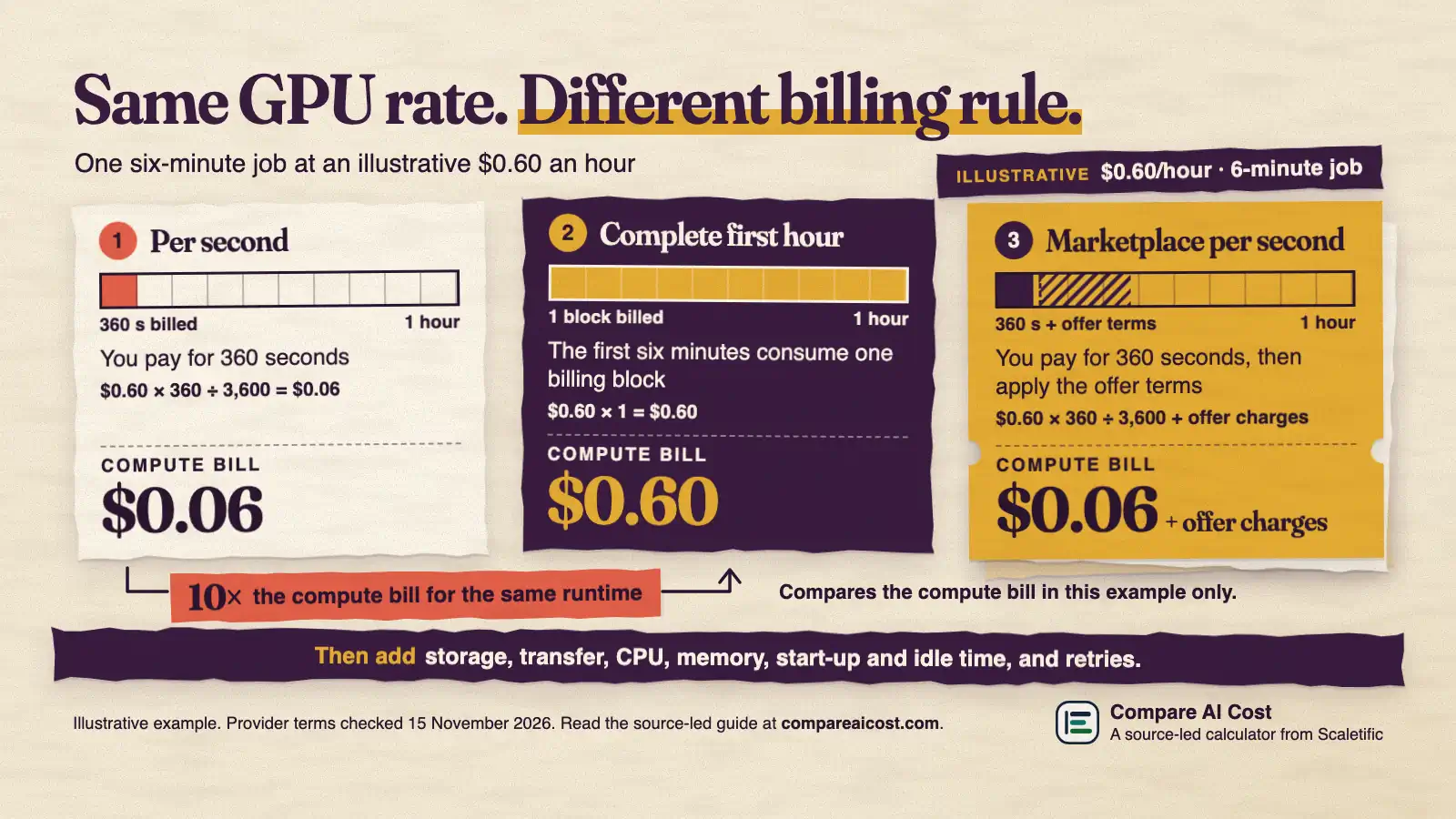
A six-minute job at $0.60 an hour
This illustration uses one shared rate to isolate the billing rule. It labels marketplace extras separately because the live offer sets those terms.
| Billing structure | Calculation | Compute bill |
|---|---|---|
| Per second | $0.60 × 360 seconds ÷ 3,600 | $0.06 |
| Complete first hour | $0.60 × 1 hour | $0.60 |
| Marketplace per second | $0.60 × 360 seconds ÷ 3,600 | $0.06 plus offer charges |
The display rate is identical in every row. The billable duration changes the compute charge by a factor of ten.
The stop event belongs in the calculation
Each provider defines the event that ends billing. DigitalOcean states that powered-off GPU Droplets continue to reserve resources and accrue charges until destruction. Hostinger charges for every hour an instance exists and also uses destruction as the billing stop. SaladCloud bills Container Engine instances while they run and ends that charge when an instance stops, is reallocated or is pre-empted.
Write the stop event into the workload runbook. A batch job can save and verify its outputs, then stop or destroy the resource through the provider's supported action.
The measured cloud GPU rendering case study shows the practical effect. Setup time, a failed Pod and storage changed the cost of the finished film even though the GPU rate looked inexpensive.
Add the costs around the GPU
A runtime estimate covers the accelerator. A finished-job estimate also covers the resources and operational time that help the workload complete.
- Storage: Runpod publishes separate container, volume and network storage rates. Vast.ai storage varies by host offer.
- Data transfer: Vast.ai offers can carry bandwidth charges. DigitalOcean includes a transfer allowance and charges for extra outbound transfer.
- CPU and memory: SaladCloud includes vCPU and RAM with each GPU. Modal prices GPU, CPU and memory as separate resources. Use the GPU memory estimator to turn a model and workload into a practical VRAM requirement, then read the model-serving guide to compare self-hosted, managed and serverless routes.
- Setup and idle time: Image pulls, environment preparation, model loading and queue gaps can occupy billable time.
- Retries: Capacity changes, interrupted instances and failed workloads can add another run.
The GPU provider rental guide explains how these costs sit beside availability, persistence and workload fit.
Five questions before choosing an offer
Ask the same questions for every shortlisted provider, then record the source and checking date with each answer.
- What is the smallest billable period or charge?
- Which resource state starts and stops billing?
- Which CPU, memory and storage resources come with the GPU?
- How are persistent storage and outbound transfer priced?
- Is the quote fixed, contract-based or moving with a marketplace?
The source-checking method explains how Compare AI Cost handles dated provider evidence, while the AI subscription and API price catalogue uses the same source-led approach.
Frequently asked questions
Is per-second GPU billing always cheaper than hourly billing?
Per-second billing usually lowers the compute charge for short runs. An hourly provider can still offer better overall value when its base rate, included storage, transfer, availability or setup experience saves more than the billing increment costs.
Does powering off a GPU instance stop billing?
The provider's lifecycle rule supplies the answer. DigitalOcean says powered-off GPU Droplets continue billing because the resources remain reserved. Hostinger ends GPU instance billing when the instance is destroyed. Check the current stop event before each deployment.
What is marketplace GPU pricing?
Marketplace pricing lets independent hosts set offers that move with supply and demand. Vast.ai combines compute, storage and bandwidth in the total cost picture, so record the offer, region and checking time when you compare it.
Is storage included in a GPU hourly rate?
The inclusion varies by provider and product. Runpod publishes separate storage rates, while SaladCloud includes vCPU and RAM with the GPU. Read each offer breakdown beside the headline rate and keep persistent storage in the finished-job estimate.
How should I compare providers with different billing units?
Choose one workload duration, apply each provider's billing increment and minimum, then add the same required resource categories. This creates a workload-level comparison while preserving the terms that make each offer distinct.
Sources and checking date
Commercial prices and plan terms were checked against the provider pages on . Provider pages remain the price authority.
The $0.60 hourly rate is an illustrative shared assumption. Provider terms were read from the official pages above on the checking date.